
Choosing the right tablet for an older adult requires balancing screen size, interface simplicity, and physical durability. The Amazon Fire HD 10 stands out as the best overall choice due to its large, bright display and the accessibility features built into Amazon’s operating system. For those prioritizing extreme simplicity and pre-loaded safety features, the GrandPad Senior Tablet offers a specialized alternative, though it comes with a subscription. Meanwhile, the Fire HD 8 Plus serves as a lightweight, wireless-charging-friendly option for users with limited mobility or smaller hands. The main tradeoff here is between the flexibility of a standard Android-based tablet and the curated, simplified experience of dedicated senior devices. Continue reading to see how these seven options stack up against each other in real-world usability.

Get comfort and care essentials delivered free — and shop member deals
- Fast, free delivery on millions of items
- Access to Prime Big Deal Days deals on October 6–7
- Prime Video, Amazon Music and more included
Complete the kit


Key Takeaways
- Screen size is the primary differentiator for readability, with the 10-inch models offering significantly better visibility than the 8-inch variants for users with vision impairments.
- The amazon.com/dp/B0CVDZ7WYW?tag=eldercarecompass-20&ascsubtag=dc-1155188″ target=”_blank” rel=”nofollow sponsored noopener”>amazon.com/dp/B0GVTPKJVT?tag=eldercarecompass-20&ascsubtag=dc-1155188″ target=”_blank” rel=”nofollow sponsored noopener”>amazon.com/dp/B09S6THZJ1?tag=eldercarecompass-20&ascsubtag=dc-1155188″ target=”_blank” rel=”nofollow sponsored noopener”>GrandPad is the only device in this lineup that removes the need for app store navigation, making it ideal for tech-averse seniors but less flexible for general use.
- Wireless charging capabilities, found on the Fire HD 8 Plus, reduce the physical strain of plugging in a device, a key factor for those with arthritis or limited dexterity.
- Refurbished and ‘Like-New’ models offer nearly identical performance to new units at a lower cost, provided the battery health is verified before purchase.
- The ‘Convenience Bundle’ for the Fire HD 10 adds essential physical protection, acknowledging that drop protection is often more critical than raw processing speed for this demographic.
| Amazon Fire HD 8 Plus Tablet (2022), 8-Inch HD Display, 32 GB, 3 GB RAM, Gray |  | Best 8-Inch Pick for Wireless Charging | Display: 8-inch HD touchscreen, 1280 × 800, 189 ppi | Processor: Hexa-core, 2.0 GHz | RAM: 3 GB | VIEW LATEST PRICE | See Our Full Breakdown |
| Amazon Fire HD 8 Tablet (Like-New, 32GB, Black) |  | Best Refurbished Compact Option | Condition: Refurbished and certified to look and work like new | Display: 8-inch HD touchscreen, 1280 × 800, 189 ppi | Processor: Hexa-core, 2.0 GHz | VIEW LATEST PRICE | See Our Full Breakdown |
| Amazon Fire HD 10 Convenience Bundle with Case and Screen Protectors (4GB RAM, 32GB, Black) |  | Best for a Ready-to-Protect Large Screen | Display: 10.1-inch 1080p Full HD | RAM: 4 GB | Storage: 32 GB; expandable by up to 1 TB via microSD | VIEW LATEST PRICE | See Our Full Breakdown |
| GrandPad Senior Tablet and Phone, 2nd Generation |  | Best Senior-Focused Interface | Generation: 2nd Generation | Battery life: 8 hours | Battery capacity: 4550 mAh | VIEW LATEST PRICE | See Our Full Breakdown |
| Amazon Fire HD 10 Tablet, 10.1-Inch Full HD Display, 4 GB RAM, 32 GB Storage, Black | 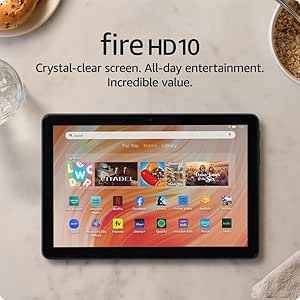 | Best Large-Screen All-Rounder | Display: 10.1-inch 1080p Full HD | Processor: Octa-core | RAM: 4 GB | VIEW LATEST PRICE | See Our Full Breakdown |
| Amazon Fire HD 8 Tablet, 8-Inch HD Display, 4GB RAM, 64GB Storage, Black | 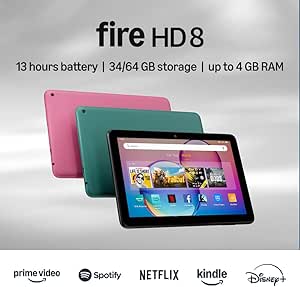 | Best Compact Pick | Display: 8-inch HD touchscreen, 1280 × 800, 189 ppi | Processor: Hexa-core 2.0 GHz | Memory: 4GB RAM | VIEW LATEST PRICE | See Our Full Breakdown |
| Amazon Fire HD 10 Tablet, 10.1-Inch Full HD Display, 3 GB RAM, 32 GB, Black (Like-New Refurbished) | | Best for a Larger Screen | Condition: Refurbished, tested, and certified to look and work like new | Display: 10.1-inch Full HD, 1920 × 1200, 224 ppi | Processor: Octa-core: 2x Arm Cortex-A76 up to 2.05 GHz and 6x Arm Cortex-A55 up to 2 GHz | VIEW LATEST PRICE | See Our Full Breakdown |
| amazon tablets for senior | Battery life | Display | Processor | Storage |
|---|---|---|---|---|
| Amazon Fire HD 8 Plus Tablet | Up to 13 hours | 8-inch HD touchscreen, 1280 × 800, 189 ppi | Hexa-core, 2.0 GHz | 32 GB; 25.2 GB available; expandable by up to 1 TB via microSD |
| Amazon Fire HD 8 Tablet | Up to 13 hours | 8-inch HD touchscreen, 1280 × 800, 189 ppi | Hexa-core, 2.0 GHz | 32 GB; 25 GB available; expandable by up to 1 TB via microSD |
| Amazon Fire HD 10 Convenience | Up to 13 hours | 10.1-inch 1080p Full HD | — | 32 GB; expandable by up to 1 TB via microSD |
| GrandPad Senior Tablet and Pho | 8 hours | — | Qualcomm, 2 GHz | — |
| Amazon Fire HD 10 Tablet | Up to 13 hours | 10.1-inch 1080p Full HD | Octa-core | 32 GB; expandable by up to 1 TB via microSD |
| Amazon Fire HD 8 Tablet | Up to 13 hours | 8-inch HD touchscreen, 1280 × 800, 189 ppi | Hexa-core 2.0 GHz | 64GB internal; 54GB available to user |
| Amazon Fire HD 10 Tablet | Up to 13 hours | 10.1-inch Full HD, 1920 × 1200, 224 ppi | Octa-core: 2x Arm Cortex-A76 up to 2.05 GHz and 6x Arm Cortex-A55 up to 2 GHz | 32GB internal; 24GB available to user |
More Details on Our Top Picks
Amazon Fire HD 8 Plus Tablet (2022), 8-Inch HD Display, 32 GB, 3 GB RAM, Gray
The Fire HD 8 Plus is a sensible middle ground for seniors who want a tablet that is easier to hold than a 10-inch model but has more breathing room than a phone. Its 3 GB of RAM and hexa-core processor support everyday reading, video calls, and streaming, while microSD expansion helps keep photos and downloads from crowding the 32 GB of built-in storage. The standout convenience is Qi wireless charging: with a separately purchased dock, charging can be less fiddly than lining up a cable. Compared with the refurbished Fire HD 8, this model adds wireless charging but shares the same display size and basic app limitations. Its 1280 × 800 screen is less spacious and sharp than the Fire HD 10’s Full HD display, and Google Play is not supported, so check that preferred apps are available through Amazon’s app store.
Pros:- Compact 8-inch size is easier to hold than the Fire HD 10
- Qi-compatible wireless charging can reduce cable handling with a separate dock
- Storage expands by up to 1 TB with a microSD card
- Up to 13 hours of battery life and 3 GB of RAM
Cons:- Google Play is not supported, limiting app choice
- Wireless charging dock is sold separately
- HD resolution offers less detail and screen area than the Fire HD 10
Best for: Seniors who prefer a lighter, compact screen and would benefit from placing the tablet on a Qi charging dock.
Not ideal for: Readers who need a larger screen, depend on Google Play apps, or want wireless charging without buying a separate dock.
- Display:8-inch HD touchscreen, 1280 × 800, 189 ppi
- Processor:Hexa-core, 2.0 GHz
- RAM:3 GB
- Storage:32 GB; 25.2 GB available; expandable by up to 1 TB via microSD
- Battery life:Up to 13 hours
- Wireless charging:Qi-compatible; dock sold separately
- Cameras:2 MP front camera; 5 MP rear camera
- Weight:12.06 oz (342 g)
Our verdict“Choose this model if a manageable 8-inch tablet and optional dock-based charging matter more than a larger Full HD screen or Google Play access.”
Amazon Fire HD 8 Tablet (Like-New, 32GB, Black)
For a senior who wants a straightforward tablet for video calls, books, and streaming, this certified refurbished Fire HD 8 keeps the familiar compact format without stepping up to a larger device. It has 3 GB of RAM, an 8-inch HD screen, and up to 13 hours of stated battery life, with microSD expansion for storing more photos and media. Compared with the Fire HD 8 Plus, it is slightly lighter and offers the same screen size and core memory, but the listed details do not include Qi wireless charging. The larger Fire HD 10 Convenience Bundle is a better fit for readers who want more screen space and included protection; this refurbished 8-inch model is easier to carry but remains less suitable for small text or split-screen use. Amazon’s app ecosystem also excludes Google Play, and some apps require subscriptions.
Pros:- Lightweight 8-inch design is manageable for handheld use
- 3 GB of RAM supports everyday tablet tasks
- Storage can expand by up to 1 TB with a microSD card
- Front and rear cameras support video calls and photos
Cons:- Refurbished condition may not suit buyers set on a new device
- Google Play is not supported
- Some apps require subscriptions, adding ongoing costs for selected services
Best for: Seniors who want a portable tablet for basic entertainment and family video calls and are comfortable buying a certified refurbished device.
Not ideal for: Buyers who want a new tablet, need Google Play apps, or prefer a larger display for reading and viewing photos.
- Condition:Refurbished and certified to look and work like new
- Display:8-inch HD touchscreen, 1280 × 800, 189 ppi
- Processor:Hexa-core, 2.0 GHz
- RAM:3 GB
- Storage:32 GB; 25 GB available; expandable by up to 1 TB via microSD
- Battery life:Up to 13 hours
- Cameras:2 MP front camera; 5 MP rear camera
- Weight:11.88 oz (337 g)
Our verdict“Pick this refurbished Fire HD 8 for portable basics if its condition and Amazon-only app selection suit the intended user.”
Amazon Fire HD 10 Convenience Bundle with Case and Screen Protectors (4GB RAM, 32GB, Black)
This bundle makes the most sense for seniors who want a larger display and would rather have basic protection included than shop for compatible accessories separately. The 10.1-inch 1080p screen gives text, photos, and video more room than either 8-inch Fire HD model, while 4 GB of RAM supports everyday multitasking. A case and two screen protectors are included, which can help protect the tablet during regular home use. Compared with the standard Fire HD 10, the hardware described here is similar in screen size, memory, and battery life; the difference is the bundled protection, not a stated performance upgrade. The larger body may be less comfortable to hold for long stretches, and the microSD card is sold separately. Check case fit carefully: the included case is specified for the 13th-generation 2023 Fire HD 10.
Pros:- 10.1-inch Full HD display gives text and images more room than the 8-inch models
- 4 GB of RAM for everyday apps and multitasking
- Case and two screen protectors are included
- Storage expands by up to 1 TB with a separately purchased microSD card
Cons:- Larger size can be tiring to hold for extended periods
- MicroSD card is sold separately, leaving 32 GB of built-in storage
- Included case is compatible only with the 13th-generation 2023 Fire HD 10
Best for: Seniors who read, watch video, or view family photos on a larger screen and want a case and screen protectors in the box.
Not ideal for: People who prioritize a light handheld tablet, need a compact device for travel, or own a Fire HD 10 from a different generation.
- Display:10.1-inch 1080p Full HD
- RAM:4 GB
- Storage:32 GB; expandable by up to 1 TB via microSD
- Battery life:Up to 13 hours
- Bundle contents:Fire HD 10 tablet, case, and two screen protectors
- Case compatibility:Fire HD 10 13th generation (2023 release)
- Color:Black
Our verdict“Choose this bundle over the compact Fire HD 8 models if screen space and included protection matter more than easy one-handed handling.”
GrandPad Senior Tablet and Phone, 2nd Generation
The GrandPad is the most purpose-built option here for seniors who want simplified communication rather than a general-purpose tablet. Its large icons and simple navigation center family photo sharing, video calls, games, and curated content, while its secure network is designed to block spam and scams. The included wireless charging cradle, case, and stylus make the package more ready for daily use than the Fire HD 10 bundle, which supplies protection but not a senior-focused interface. The tradeoff is a more restricted service: full functionality requires a GrandPad plan, and the tablet is not compatible with other wireless carriers. Its stated battery life is eight hours, shorter than the up-to-13-hour claims for the Fire tablets. Treat 911 access as plan-dependent rather than a standard feature.
Pros:- Large icons and simplified navigation are designed around senior users
- Supports voice and video calls, photo sharing, and multiplayer games
- Wireless charging cradle, protective case, and stylus are included
- Secure network is designed to block spam and scams
Cons:- A GrandPad plan is required for full functionality
- Not compatible with other wireless carriers
- Stated eight-hour battery life is shorter than the Fire tablets’ up-to-13-hour claims
- 911 calling is available only with select plans
Best for: Seniors who find standard tablet menus difficult and mainly want family calls, shared photos, and a guided set of simple activities.
Not ideal for: Independent app users who want carrier flexibility, broad app-store access, or to avoid a required GrandPad plan for full functionality.
- Generation:2nd Generation
- Battery life:8 hours
- Battery capacity:4550 mAh
- Processor:Qualcomm, 2 GHz
- Cameras:5 MP front and rear
- Video capture:HD 720p
- Included components:Wireless charging cradle, protective case, and stylus
- Connectivity:Requires a GrandPad plan; incompatible with other wireless carriers
Our verdict“Choose GrandPad for guided, family-centered communication if its required plan and limited carrier flexibility are acceptable.”
Amazon Fire HD 10 Tablet, 10.1-Inch Full HD Display, 4 GB RAM, 32 GB Storage, Black
This standard Fire HD 10 is the stronger fit for seniors who want a roomy screen for streaming, reading, or video calls but do not need GrandPad’s guided interface. Its 10.1-inch 1080p display offers more usable space than the Fire HD 8 Plus, and 4 GB of RAM pairs with an octa-core processor for everyday apps and media. A 5 MP front camera is useful for video calls, while support for a pressure-sensitive stylus gives users another way to write or tap, though the stylus is sold separately. Compared with the Fire HD 10 Convenience Bundle, this listing does not include a case or screen protectors, so buyers should arrange protection separately. It also starts with only 32 GB of storage; microSD expansion is available, but the card is not included. Google Play is not listed as supported for Fire tablets.
Pros:- 10.1-inch 1080p Full HD display provides more viewing area than the Fire HD 8 models
- 4 GB of RAM and an octa-core processor support everyday use
- 5 MP front-facing camera for video calls
- Expandable storage and pressure-sensitive stylus support
Cons:- MicroSD card and stylus are sold separately
- 32 GB of built-in storage may fill quickly with downloads and photos
- Does not include the case and screen protectors supplied with the Fire HD 10 Convenience Bundle
Best for: Seniors who want a larger display for reading and video, use Alexa, and are comfortable choosing their own case and optional stylus.
Not ideal for: Buyers who want included protective accessories, need ample built-in storage without expansion, or prefer a simplified senior-specific interface.
- Display:10.1-inch 1080p Full HD
- Processor:Octa-core
- RAM:4 GB
- Storage:32 GB; expandable by up to 1 TB via microSD
- Battery life:Up to 13 hours
- Front-facing camera:5 MP
- Stylus support:4,096 levels of pressure sensitivity; stylus sold separately
- Recycled materials:12%
Our verdict“Pick this Fire HD 10 for a spacious general-purpose screen if you are willing to add protection and storage accessories separately.”
Amazon Fire HD 8 Tablet, 8-Inch HD Display, 4GB RAM, 64GB Storage, Black
For seniors who want a tablet that is easy to hold for longer reading sessions, the Fire HD 8 is the more portable choice in this group. Its 11.88-ounce body is lighter than the refurbished Fire HD 10, while 4GB of RAM and 64GB of storage give it more room for apps and downloaded media than that model’s 3GB and 32GB. The tradeoff is a smaller, lower-resolution screen: text and video have less viewing space than on the 10.1-inch HD 10, which may matter for readers who prefer larger print. Battery life of up to 13 hours and Alexa support suit everyday browsing, calls, and entertainment, but Google Play is not supported, and some apps require subscriptions. I’d pick it for comfortable portability, not for the biggest screen.
Pros:- Lightweight 11.88-ounce design is easier to hold than the Fire HD 10
- 4GB RAM and 64GB storage provide more capacity than the refurbished Fire HD 10
- Up to 13 hours of battery life supports extended reading and viewing
- MicroSD expansion up to 1TB and Alexa support add flexibility
Cons:- Eight-inch, 1280 × 800 display offers less viewing space and detail than the Fire HD 10
- Google Play is not supported, limiting access to some Android apps
- Some apps and services require separate subscriptions
Best for: Seniors who want a lightweight tablet for reading, video calls, and casual streaming, with more built-in storage than entry-level Fire models.
Not ideal for: Seniors who need a large screen for bigger text or rely on apps that are only available through Google Play.
- Display:8-inch HD touchscreen, 1280 × 800, 189 ppi
- Processor:Hexa-core 2.0 GHz
- Memory:4GB RAM
- Storage:64GB internal; 54GB available to user
- Expandable storage:Up to 1TB via microSD
- Battery life:Up to 13 hours
- Weight:11.88 ounces (337 grams)
- Connectivity and ports:Dual-band Wi-Fi, Bluetooth 5.2, USB-C 2.0, microSD slot, 3.5 mm audio jack
Our verdict“Choose this Fire HD 8 if easy handling and generous built-in storage matter more than the larger screen of the Fire HD 10.”
Amazon Fire HD 10 Tablet, 10.1-Inch Full HD Display, 3 GB RAM, 32 GB, Black (Like-New Refurbished)
The refurbished Fire HD 10 is the better fit for seniors who want a broad screen for video, games, or enlarged text. Its 10.1-inch 1080p display gives content more room than the compact Fire HD 8, and dual speakers can make casual viewing easier without headphones. The larger format also weighs 15.29 ounces, so it is less comfortable to hold one-handed for long stretches. Compared with the new Fire HD 10 with 4GB RAM, this refurbished version has 3GB RAM and 32GB storage, with only 24GB available to the user; a microSD card can add capacity, but is sold separately. It is tested and certified to look and work like new, yet buyers who prefer a new device or want more internal storage should choose the other Fire HD 10 instead.
Pros:- 10.1-inch 1080p display provides more space and detail than the Fire HD 8
- Dual integrated speakers and a 3.5 mm jack offer flexible audio options
- Up to 13 hours of battery life
- MicroSD expansion supports up to 1TB of additional storage
Cons:- Refurbished condition may not suit buyers who want a new device
- Only 24GB of the 32GB internal storage is available to the user
- Heavier than the Fire HD 8 and less convenient to hold for extended reading
Best for: Seniors who prioritize a large, sharp screen for video and larger on-screen text, and are comfortable buying a refurbished tablet.
Not ideal for: Readers who want a light one-handed device, more built-in storage, or the reassurance of a new tablet rather than a refurbished model.
- Condition:Refurbished, tested, and certified to look and work like new
- Display:10.1-inch Full HD, 1920 × 1200, 224 ppi
- Processor:Octa-core: 2x Arm Cortex-A76 up to 2.05 GHz and 6x Arm Cortex-A55 up to 2 GHz
- Memory:3GB RAM
- Storage:32GB internal; 24GB available to user
- Expandable storage:Up to 1TB via microSD card
- Battery life:Up to 13 hours
- Weight:15.29 ounces (433.6 grams)
- Audio and connectivity:Dual speakers, 3.5 mm stereo jack, dual-band Wi-Fi; Wi-Fi 6 not supported
Our verdict“Pick this refurbished Fire HD 10 for a larger, sharper viewing area if its lower available storage and heavier body are acceptable.”
How We Picked
I evaluated these tablets based on usability for older adults, focusing specifically on screen legibility, touch responsiveness, and the complexity of the initial setup. A device might have powerful specs, but if the icons are too small or the menu hierarchy is confusing, it fails the primary test for this audience. I also weighed the importance of physical accessibility, such as weight, button placement, and charging mechanisms, which directly impact daily independence.
Furthermore, I considered the ecosystem lock-in. Amazon’s Fire OS is restrictive by design, which can be a benefit for preventing accidental purchases or exposure to scams, but a drawback for those wanting standard Android apps. The ranking reflects a balance between these safety features and general utility, ensuring that each pick serves a distinct type of senior user, from the tech-savvy grandparent to the individual requiring maximum simplicity.
| amazon tablets for senior | Processor |
|---|---|
| Amazon Fire HD 8 Plus Tablet | Hexa-core, 2.0 GHz |
| Amazon Fire HD 8 Tablet | Hexa-core, 2.0 GHz |
| Amazon Fire HD 10 Convenience | — |
| GrandPad Senior Tablet and Pho | Qualcomm, 2 GHz |
| Amazon Fire HD 10 Tablet | Octa-core |
| Amazon Fire HD 8 Tablet | Hexa-core 2.0 GHz |
| Amazon Fire HD 10 Tablet | Octa-core: 2x Arm Cortex-A76 up to 2.05 GHz and 6x Arm Cortex-A55 up to 2 GHz |
Factors to Consider When Choosing Amazon Tablets For Seniors
Selecting a tablet for a senior citizen is less about processor speed and more about reducing friction in daily use. The following factors will help you filter through the technical specifications to find a device that enhances rather than complicates their life.
Prioritize Screen Size and Resolution
For many seniors, text legibility is the primary barrier to tablet adoption. A 10-inch screen allows for larger default font sizes and more comfortable touch targets, reducing the likelihood of accidental taps. While 8-inch tablets are lighter, they often force users to zoom in frequently, which can be frustrating for those with limited fine motor control. I recommend choosing a Full HD resolution (1080p or higher) to ensure that text remains sharp and not pixelated when enlarged. If the user already wears reading glasses for fine print, the larger screen becomes a non-negotiable feature for comfortable daily use.
Evaluate Interface Complexity and Setup
Amazon’s Fire OS is designed to be simple, but it still presents choices that can overwhelm a new user. The GrandPad eliminates this decision fatigue by removing the app store and limiting features to a curated set. In contrast, standard Fire tablets require the user to navigate settings, updates, and potential pop-ups. If you are setting up the device for the senior, consider how much ongoing technical support you can provide. A device with a more locked-down interface requires less maintenance but offers less flexibility for future needs like video calling apps or news aggregators.
Consider Physical Ergonomics and Charging
Weight and button placement matter more than you might expect. Heavy tablets can cause wrist strain if held for extended periods, while poorly placed volume buttons can lead to frustration. Look for models with clearly defined physical buttons rather than relying solely on on-screen controls. Additionally, wireless charging, as seen on the Fire HD 8 Plus, can be a game-changer for users with arthritis who struggle with aligning a micro-USB or USB-C plug. This small ergonomic detail can determine whether the device is used daily or abandoned due to physical discomfort.
Assess the Need for Protective Accessories
A tablet is useless if it breaks from a minor drop. Seniors may have reduced grip strength or slower reflexes, making robust cases a mandatory purchase, not an optional extra. The ‘Convenience Bundle’ options are valuable because they include high-quality cases and screen protectors, saving you the hassle of finding compatible accessories. A thick, rubberized case also provides better grip, reducing the chance of the device slipping out of hands. Investing in protection upfront protects your investment and extends the device’s lifespan in a household where it might be handled less carefully than a smartphone.
Understand the Subscription Tradeoffs
Some senior-focused tablets, like the GrandPad, require a monthly subscription to function. This cost covers the simplified service, 24/7 support, and pre-loaded content. Standard Amazon Fire tablets do not require a subscription, though you may choose to pay for services like Amazon Kids+ or Prime. Weigh the ongoing cost against the value of hands-off support. If you are tech-savvy and live nearby, you might skip the subscription and handle setup yourself. If the senior lives alone and you cannot troubleshoot remotely, the subscription fee may be worth the peace of mind and guaranteed support line.
Frequently Asked Questions
Can seniors use standard apps like Zoom or WhatsApp on Amazon Fire tablets?
Yes, but with limitations. Amazon Fire tablets run Fire OS, which is based on Android but does not have access to the Google Play Store. You can install apps like Zoom and WhatsApp via the Amazon Appstore or by sideloading APK files, though the latter requires technical know-how. For many seniors, this adds unnecessary complexity. If access to specific Android-only apps is required, a standard Android tablet or an iPad might be a better fit, despite the higher cost or different interface.Is the GrandPad worth the monthly subscription compared to a standard Fire tablet?
The GrandPad is worth the subscription if the user struggles with technology or lives independently without close family support. It removes the risk of accidental purchases, scams, and confusing updates by locking the interface to a simplified menu. A standard Fire tablet is free of subscription costs but requires you to manage settings, updates, and security. If you can handle the initial setup and occasional troubleshooting, the Fire tablet offers better value and more flexibility for future needs.How important is the ‘Plus’ model with wireless charging for a senior user?
The wireless charging feature on the Fire HD 8 Plus is highly valuable for users with arthritis, poor eyesight, or limited dexterity. Plugging in a small USB-C cable can be difficult for shaky hands or poor vision. Wireless charging allows the user to simply place the tablet on a dock, reducing physical strain and frustration. If the user has no mobility issues, the standard model is sufficient and more affordable, but the ergonomic benefit of wireless charging often justifies the price difference for this demographic.Should I buy a refurbished or ‘Like-New’ Amazon tablet for a senior?
Yes, buying refurbished or ‘Like-New’ models is a smart way to save money without sacrificing performance. Amazon’s refurbished program typically includes a warranty and ensures the device is fully functional. However, you must check the battery health, as older batteries may not hold a charge as long as new ones. For a senior who uses the tablet primarily for reading or video calls while plugged in, battery life is less critical. If they need portability, verify the battery cycle count or consider buying new to guarantee all-day usage.What is the main difference between the Fire HD 8 and Fire HD 10 for senior use?
The primary difference is screen real estate and readability. The Fire HD 10’s 10.1-inch screen allows for larger default text and icons, making it easier to read news articles or send emails without constant zooming. The Fire HD 8 is lighter and more portable, which is better for travel or users with limited arm strength. For home use where the tablet will sit on a table or lap, the HD 10 is generally superior for accessibility. The HD 8 is better suited for short, on-the-go usage sessions.Conclusion
Choosing the right tablet for a senior depends heavily on their physical abilities and technical comfort level. For most users, the Amazon Fire HD 10 is the best overall choice because its large screen and Full HD resolution provide the clearest reading experience, reducing eye strain and accidental taps. If your primary concern is absolute simplicity and you want to eliminate the need for app management, the GrandPad Senior Tablet is the best premium option, offering a curated, safe environment at the cost of a subscription. For those who struggle with fine motor skills or charging ports, the Fire HD 8 Plus offers the best ergonomic value with its wireless charging dock. If budget is the main constraint, the Fire HD 10 Refurbished provides nearly identical functionality to the new model at a lower price, making it the best value pick for tech-savvy families who can handle minor setup tasks themselves.
Fall Picks
fall essentials
As an affiliate, we earn on qualifying purchases.