
Choosing a senior-friendly tablet involves balancing simplicity, screen size, and affordability. The GrandPad stands out as the best overall, thanks to its user-friendly interface and dedicated senior features. The Samsung Galaxy Tab A11+ offers a versatile experience with expandable storage and a larger display, making it ideal for more tech-savvy seniors. However, tradeoffs include higher prices for premium models or limited features on budget options. Continue reading for a detailed breakdown of these options and more to find the best fit for your needs.

Turn quiet afternoons into listening time
- Thousands of audiobooks, podcasts and originals
- Listen on your phone, tablet or Echo — also offline
- Cancel anytime
Complete the kit


Key Takeaways
- Top picks balance ease of use with sufficient performance for everyday tasks.
- Screen size varies widely, impacting visibility and portability—larger screens aid seniors with vision but reduce portability.
- Price range is broad; more expensive options tend to offer better interfaces and durability, but budget models can still serve basic needs.
- Expandable storage and battery life are often overlooked but critical for long-term usability.
- User interface simplicity and dedicated senior features are key differentiators among top options.






More Details on Our Top Picks
GrandPad Easy-to-Use Tablet & Phone for Seniors
GrandPad stands out as the most senior-focused device, prioritizing ease of use with large icons, simple navigation, and a secure network that blocks spam and scams. Unlike the Fire HD 8, which offers vibrant streaming capabilities but has a more generic interface, GrandPad’s design centers on effortless connection with family. Its subscription plan, starting at $25/month, can be a downside for those seeking a straightforward, no-cost device, but it guarantees a safe, ad-free environment. This model is especially suited for seniors who value safety and family sharing over multimedia flexibility, but those wanting more entertainment options without ongoing costs might find it limiting. The device’s locked network and curated apps help minimize confusion, making it ideal for less tech-savvy users. However, limited functionality without a plan and carrier restrictions are tradeoffs to consider.
Pros:- User-friendly interface with large icons and simple navigation
- Secure network that blocks spam and scams
- Supports family sharing through dedicated apps
- Designed specifically for senior safety and ease of use
Cons:- Limited functionality without a paid plan
- Not compatible with all wireless carriers
- Requires activation and ongoing subscription
Best for: Seniors who prioritize safety, simplicity, and family connectivity over multimedia versatility
Not ideal for: Tech-savvy seniors or those wanting a device with extensive app access without ongoing subscription fees
- Compatibility:Locked to specific wireless carriers, not compatible with Consumer Cellular
- Connectivity:Wi-Fi
- Includes:Tablet, phone, curated apps, virtual companion
- Features:Large icons, easy navigation, spam/scam blocking, voice/video calls, photo sharing
Our verdict“This tablet is best for seniors who need a safe, straightforward device primarily for staying connected with family.”
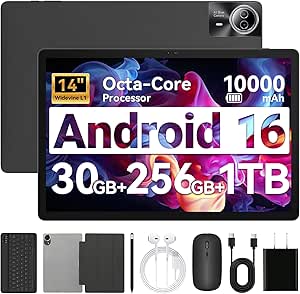
URAO 14-inch Android Tablet with 30GB RAM, 256GB Storage, and Accessories
This 14-inch URAO tablet offers a vibrant, high-resolution display and a powerful octa-core processor, making it well-suited for multitasking and media consumption. Compared with the smaller URAO 10.1-inch model, it’s better for users who want a larger screen for reading, browsing, or even light productivity. Its support for a wide range of accessories—including a keyboard and stylus—makes it a flexible choice for older adults seeking a tablet that can double as a laptop for light work. However, the device’s substantial size might be cumbersome for those who prefer portability, and its Android 16 system may have limited app compatibility compared to newer Android versions. The absence of GPS and the need to purchase accessories separately are additional factors to consider.
Pros:- Large, vivid display ideal for multimedia and reading
- Powerful octa-core processor ensures smooth multitasking
- Supports a wide array of accessories for customization
- Long-lasting battery with fast charging
Cons:- Bulky size may limit portability
- No built-in GPS functionality
- Android 16 may have app compatibility issues
Best for: Older adults who desire a high-performance device for entertainment, browsing, and light work, and don’t mind its size
Not ideal for: Seniors needing a highly portable device or those with limited tech experience in setting up accessories
- Display:14 inch, 1920×1200 IPS
- RAM:30GB (6+24GB)
- Storage:256GB ROM, expandable up to 1TB
- Battery:10000mAh with 30W fast charging
- Processor:Octa-core 2.0 GHz
- Connectivity:Wi-Fi 6, Bluetooth 5.4
Our verdict“This tablet makes the most sense for seniors who seek a large-screen device for versatile use and are comfortable with its size and setup.”
URAO 10.1-inch Android Tablet, Octa-core, 16GB RAM + 128GB Storage
The URAO 10.1-inch tablet balances performance with portability, offering a high-resolution IPS display and a robust octa-core processor that handles online learning and media browsing smoothly. Compared with the larger 14-inch model, it’s easier to handle and transport, making it ideal for seniors who want a reliable device for daily tasks. Its expandable storage up to 1TB and support for Wi-Fi 6 and Bluetooth 5.4 ensure fast connectivity and ample space for apps and media. However, the display resolution might seem modest for users accustomed to ultra-sharp screens, and the lack of GPS limits navigation options. Its Android 16 system may also restrict compatibility with some apps designed for newer or different platforms.
Pros:- High-performance octa-core processor
- Expandable storage up to 1TB
- Long battery life with quick charging
- Supports latest Wi-Fi 6 and Bluetooth 5.4
Cons:- Display resolution may be basic for some users
- No GPS functionality
- Incompatible with iOS apps
Best for: Seniors interested in online courses, reading, and casual browsing who prefer a manageable size
Not ideal for: Those needing GPS features or advanced gaming or media editing
- Display:10.1 inches, 1280*800 IPS
- Processor:Octa-core 1.8 GHz
- RAM:16GB
- Storage:128GB ROM, expandable up to 1TB
- Battery:Large capacity with 8 hours usage, fast charging
- Connectivity:Wi-Fi 6, Bluetooth 5.4
Our verdict“This device suits seniors seeking a capable, portable Android tablet for everyday tasks and online learning.”
Amazon Fire HD 8 Tablet (Newest Model), 8” HD Display, 4GB RAM, 64GB Storage, Black
The Fire HD 8 offers a compact, lightweight design with a vibrant 8-inch HD display, making it ideal for streaming videos, reading, and light browsing. Its hexacore processor delivers responsive performance for everyday tasks, and with up to 13 hours of battery life, it’s suitable for extended use on the go. Compared to more senior-oriented options like the Pix Star Touch, the Fire’s interface is less simplified, and it relies on Amazon’s Appstore, which limits app choices unless sideloaded. Its expandable storage is a plus, but lack of Google Play support can restrict access to familiar apps. This device is perfect for seniors who want an affordable, straightforward tablet primarily for entertainment rather than complex tasks or safety features.
Pros:- Bright, clear HD display for media consumption
- Long battery life up to 13 hours
- Expandable storage up to 1 TB
- Compact and lightweight design
Cons:- Limited app options due to Amazon Appstore only
- No Google Play support
- Less tailored for senior safety and simplicity
Best for: Budget-minded seniors seeking a basic media tablet for streaming, reading, and casual browsing
Not ideal for: Older adults needing a dedicated senior device with simplified interface and safety features
- Display:8 inches HD
- RAM:4 GB
- Storage:64 GB
- Expandable Storage:Up to 1 TB
- Battery Life:Up to 13 hours
- Processor:Hexa-core
Our verdict“This tablet fits seniors wanting an affordable device for media and casual use, with some limitations on app access.”
Pix Star Touch Easy-to-Use Tablet for Seniors, 10.1-Inch Screen, WiFi, 2 Cameras
The Pix Star Touch is designed with senior ease in mind, featuring a straightforward interface and a 10.1-inch screen that balances visibility and portability. Its support for email, browsing, video calls, and photo sharing makes it a versatile choice for staying connected. Compared with the larger URAO 14-inch tablet, the Pix Star is more manageable for users who find bigger devices cumbersome. Its support for Google Play allows app flexibility, but its limited storage capacity of 32GB can be a drawback for heavy media use. Battery details are not specified, which might be a concern for users wanting all-day usage. Overall, this tablet makes a good first step for seniors new to digital devices who prefer simple, familiar features.
Pros:- Intuitive and simple interface perfect for beginners
- Supports essential apps like email and video calls
- Front and rear cameras for photos and video chats
- Allows app installation via Google Play
Cons:- Limited storage for media-heavy use
- Battery life not specified, possible limited endurance
- Basic hardware specs for advanced tasks
Best for: Beginners and seniors seeking an easy-to-use device for communication and basic browsing
Not ideal for: Power users or those needing extensive storage or advanced features
- Screen Size:10.1 inches
- Storage Capacity:32 GB
- Ports:1 USB-C port
- Cameras:Front and back cameras
Our verdict“This tablet offers a straightforward, accessible experience suitable for seniors new to digital devices and communication.”
Samsung Galaxy Tab A11+ 6GB RAM, 128GB Storage, Expandable Storage, Gray
This model stands out for its large, bright 11-inch display, making reading and streaming comfortable for seniors who prefer bigger screens. Compared with the Lenovo Tab One, it offers a more immersive audio experience thanks to quad speakers with Dolby Atmos, which enhances entertainment. Its long-lasting battery and fast charging support ensure fewer interruptions during use. However, the MicroSD card is sold separately, and fast-charging requires an additional charger, adding minor extra costs. The expandable storage is a key advantage for users with lots of media or documents. This pick makes the most sense for seniors who want a versatile, family-friendly device that balances screen size, battery life, and multimedia features.
Pros:- Large, bright 11-inch display ideal for reading and streaming
- Long-lasting battery with quick recharge capabilities
- Expandable storage for additional files and apps
- Quad speakers with Dolby Atmos for immersive audio
Cons:- MicroSD card sold separately adds extra cost
- Requires a 25W charger for fast charging, also sold separately
Best for: Seniors who want an all-around tablet suitable for streaming, video calls, and light productivity with room to grow.
Not ideal for: Those who prefer a budget-friendly, simple device or don’t want to purchase additional accessories for full functionality.
Our verdict“This tablet offers a well-rounded experience suited for seniors who value a large display and multimedia features, with some minor accessory costs.”
ECOPAD 10.1 Inch Android Tablet, 12GB RAM, 64GB Storage, 1280×800 IPS Touchscreen, 6000mAh Battery, Bluetooth 5.0, Dual Cameras, Black
The ECOPAD’s 10.1-inch HD IPS screen provides clear visuals, making it ideal for streaming, reading, and video calls. It surpasses the DigiLand in performance with 12GB of RAM, which supports smoother multitasking and more demanding applications. Its long battery life of up to 8 hours aligns with seniors needing extended use without frequent recharging. The dual cameras are a plus for video calls and capturing moments. Nevertheless, Android 15 OS may have limited app compatibility initially, and the SD card support is sold separately. Its high RAM makes it suitable for those who want a more responsive device for multimedia and productivity, but less ideal for users who need plug-and-play simplicity.
Pros:- Large 10.1-inch HD IPS display for crisp visuals
- High 12GB RAM supports smooth multitasking
- Long 8-hour battery life for all-day use
- Dual cameras for video calls and photos
Cons:- Android 15 OS may limit app compatibility at first
- SD card sold separately, adding additional cost
Best for: Tech-savvy seniors or those who do light multitasking and media consumption without requiring cellular connectivity.
Not ideal for: Seniors seeking a simple, plug-and-play device or those with limited experience updating or configuring new software.
Our verdict“The ECOPAD excels for multimedia multitasking but may require a bit more technical comfort from its user.”
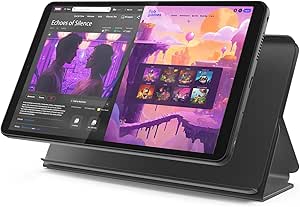
Lenovo Tab One – Lightweight 8.7″ HD Display Tablet with 4GB RAM and 64GB Storage
The Lenovo Tab One’s compact 8.7-inch display makes it highly portable, especially for seniors who want a lightweight device for quick tasks and entertainment. While it offers a long battery life of over 12 hours, its 4GB RAM limits multitasking compared to larger models like the ECOPAD, making it less suitable for intensive use. Its inclusion of a folio case with a stand adds convenience for reading or video viewing on the go. However, the smaller screen and lower RAM make it less ideal for users who need to browse multiple apps simultaneously or use the device for more demanding tasks. This pick is perfect for seniors prioritizing portability and straightforward use over heavy multitasking or media editing.
Pros:- Very lightweight and portable design
- Long battery life for all-day use
- Includes a convenient folio case with stand
- Vibrant display with immersive sound
Cons:- Limited storage for media-heavy use
- Less powerful processor for demanding tasks
Best for: Seniors who want a lightweight, easy-to-handle device primarily for reading, browsing, and casual streaming.
Not ideal for: Those who need a larger screen or plan to run multiple apps at once, or require cellular connectivity options.
Our verdict“A portable, simple tablet suited for seniors who prioritize ease of handling and basic entertainment.”
DigiLand Android Tablet with HD Touch Screen, WiFi, Lightweight for Study, Reading & Streaming – Blue
The DigiLand’s HD touch screen makes browsing, reading, and streaming accessible for seniors new to tablets, with a lightweight build for easy handling. Compared with larger, more feature-rich tablets like the ECOPAD or Samsung Galaxy Tab A11+, it offers a straightforward experience focused on casual use. Its simple interface and portability make it ideal for seniors who want an uncomplicated device for daily entertainment. However, it lacks cellular connectivity and GPS, limiting its use outside WiFi zones. Its modest specs suit light tasks, but less demanding users will find it sufficient. This device makes the most sense for seniors seeking an easy, no-fuss tablet for reading, browsing, and streaming, especially if they are unfamiliar with technology.
Pros:- Easy-to-use interface for beginners
- Lightweight and portable for everyday use
- Clear HD display for media consumption
Cons:- No GPS or cellular connectivity
- Limited to WiFi, restricting outdoor use
Best for: Beginners or seniors who want an uncomplicated device primarily for reading, browsing, and streaming within WiFi zones.
Not ideal for: Tech-savvy seniors or those needing GPS or cellular data for outdoor use or navigation.
Our verdict“A simple, lightweight tablet perfect for seniors new to digital devices and primarily used at home or in WiFi zones.”
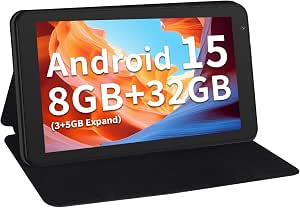
7 Inch Tablet with Case, 32GB + 1TB Expandable, 5G WiFi, IPS Display
This 7-inch tablet’s small size makes it exceptionally portable, ideal for seniors who prefer a pocket-sized device for quick tasks, reading, and browsing. Its latest Android 15 OS ensures smooth performance, and the 8GB RAM supports basic multitasking. The expandable storage up to 1TB is a significant advantage for media libraries. However, the 3500mAh battery limits usage to around 4 hours of video playback, which may be inconvenient for all-day use. Its small screen might be too compact for prolonged reading or detailed tasks, but it’s very lightweight and easy to carry. This device makes the most sense for seniors who want a compact, affordable device for quick, light tasks on the go, not for prolonged media consumption or intensive use.
Pros:- Latest Android 15 OS for smooth operation
- Expandable storage up to 1TB
- Lightweight with a protective case included
- Dual-band WiFi with 5G support
Cons:- Limited battery life for extended use
- Small screen size may be less comfortable for long reading sessions
Best for: Seniors who prioritize portability and need a device for occasional reading, browsing, and light entertainment.
Not ideal for: Those who prefer larger screens or plan lengthy sessions of media streaming or document editing.
Our verdict“A highly portable, quick-access tablet suitable for seniors who need a compact device for light, on-the-go use.”
AGM PAD T2 Tablet, 11″ FHD 500-Nit Display, 256GB Storage, Includes Case & Screen Protector
The AGM PAD T2 stands out for its exceptionally bright FHD 1920×1200 display with 500-nit brightness, making it one of the best choices for seniors who enjoy outdoor reading or streaming without glare. Compared to the Amazon Fire HD 8, which has a smaller 8-inch screen and less brightness, this tablet offers a larger, more vivid display. The generous 256GB of storage supports plenty of apps and media, but it’s primarily designed for basic browsing, reading, and streaming, not intensive multitasking or gaming. Its included protective case and screen protector appeal to seniors concerned about durability, though its battery life isn’t specified, raising questions about long-term daily use. This pick makes the most sense for seniors who prioritize screen clarity and outdoor usability over high-end performance or advanced features.
Pros:- Bright 500-nit display ideal for outdoor use
- Large 256GB storage supports many apps and files
- Includes protective case and screen protector for durability
Cons:- No detailed info on battery life for daily use
- Limited to basic tasks, not suitable for advanced applications
Best for: Seniors who frequently read outdoors or stream videos in bright environments and want a durable, large-screen device.
Not ideal for: Tech-savvy seniors seeking a high-performance tablet for multitasking or creative work, as it’s limited to basic functions.
- Display:11″ FHD 1920×1200, 500-nit brightness
- Storage:256GB
- Battery:7850mAh
- Included Accessories:Case, Screen Protector
Our verdict“A solid choice for seniors who need a bright, large-screen tablet primarily for reading and streaming outdoors.”
Coopers 10-inch Android 15 Tablet, 32GB ROM, 1TB Expandable, Quad-Core, 6000mAh Battery, IPS Touch Screen, Dual HD Cameras
The Coopers 10-inch Android 15 tablet offers a high-performance experience with its quad-core processor and 8GB RAM, making it more capable than the Amazon Fire HD 8 for multitasking and app use. Its bright IPS display with wide viewing angles enhances video calls and reading, while the 6000mAh battery supports 8-10 hours of continuous use. The support for up to 1TB expansion via SD card makes it ideal for users who need extensive storage without paying for large internal memory. However, internal storage is limited at 32GB, and the front camera is basic, which could be a drawback for online chatting or video calls. Unlike the rugged AGM PAD T2, it isn’t designed for outdoor durability. This tablet best suits seniors who want a versatile device for multimedia, browsing, and staying connected.
Pros:- Quad-core processor with expandable RAM for smooth multitasking
- Bright IPS display with wide viewing angles
- Long-lasting 6000mAh battery supports extended use
- Supports up to 1TB SD card for extensive storage
Cons:- Limited internal storage at 32GB without expansion
- Basic front camera quality may impact video calls
Best for: Seniors seeking a high-performance, expandable storage tablet for multimedia, video calls, and everyday browsing.
Not ideal for: Those who prefer a compact or rugged device for outdoor use or who need a simple device with minimal setup.
- Display:10 inch, 1280×800 IPS
- Processor:Quad Core
- RAM:8GB (3+5GB expandable)
- Storage:32GB, expandable to 1TB via SD card
- Battery:6000mAh
- Cameras:8MP rear, 2MP front
Our verdict“A versatile, high-performance tablet ideal for seniors who want multimedia capabilities and expandable storage for daily use.”
How We Picked
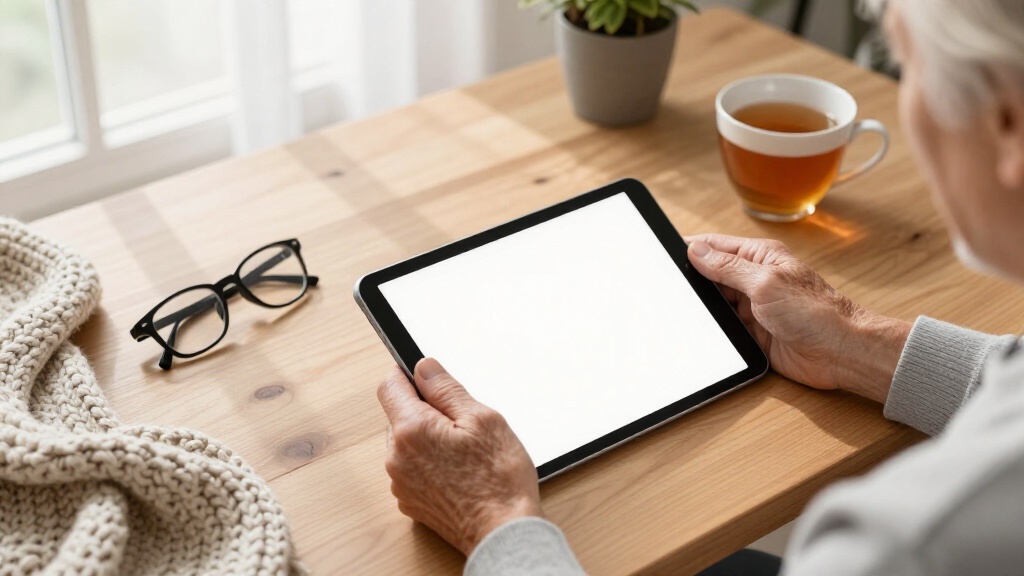
Our selection process focused on evaluating each tablet’s usability, build quality, and value specifically for senior users. We prioritized devices with clear, simple interfaces, large displays, and accessible features like loud speakers or emergency buttons. Battery life, durability, and customer support also influenced rankings, as these factors affect daily convenience. We compared these products based on real-world needs such as reading, video calls, and light browsing, ensuring each option offers a meaningful advantage for seniors at different comfort levels with technology.Factors to Consider When Choosing Senior-friendly Tablets
When choosing a senior-friendly tablet, it’s essential to consider factors that enhance ease of use, safety, and long-term satisfaction. Not all devices labeled as senior tablets are equally suited for every user, so understanding key features can make a real difference in choosing the right device for yourself or a loved one.Screen Size and Display Quality
For seniors, larger screens generally improve readability and reduce eye strain. Look for tablets with at least a 8-inch display; anything smaller may be difficult to see comfortably. Additionally, high-resolution screens with good color contrast make content clearer and more engaging. However, larger screens can mean a bulkier device, so balancing size with portability is important based on how the tablet will be used.
Ease of Use and Interface
Simple, intuitive user interfaces are vital for seniors who are less comfortable with technology. Devices that come preloaded with senior-friendly apps or customized home screens reduce frustration. Avoid overly complex menus or settings that require frequent adjustments. Some tablets include dedicated buttons for emergency calls or voice assistants, which can greatly enhance safety and convenience for elderly users.
Battery Life and Durability
Long battery life minimizes the need for frequent charging, which can be inconvenient for seniors. Aim for devices that last at least 8-10 hours of typical use. Durability also matters—consider tablets with sturdy builds or cases, especially if they will be used by users prone to dropping devices. Water resistance is a bonus, but not essential for most senior users.
Price and Expandability
Budget options can meet basic needs but often lack advanced features or durability. More expensive models tend to offer better screens, faster processors, and longer support. Also, consider whether the tablet offers expandable storage, which can be a cost-effective way to increase capacity without paying for higher internal storage upfront. Think about the long-term value and whether additional accessories or services are included.
Support and Accessibility Features
Responsive customer support and accessible features—like hearing aid compatibility, adjustable font sizes, and voice control—are important for ongoing usability. Check if the manufacturer provides easy setup guides or tech support tailored for seniors. Accessibility features can significantly improve independence, making daily use more comfortable and less frustrating.
Frequently Asked Questions
How do I know if a tablet is truly senior-friendly?
To determine if a tablet suits a senior, look for features like a simplified interface, large icons, and adjustable font sizes. Devices specifically marketed as ‘senior-friendly’ often include dedicated emergency buttons, voice assistants, or hearing aid compatibility. User reviews from other seniors can offer insights into real-world ease of use. Ultimately, the device should feel intuitive and reduce frustration, not add to it.
Is a larger screen always better for seniors?
While bigger screens make content easier to see and read, they can also make the device bulkier and less portable. For seniors with limited hand strength or dexterity, a larger screen with a lightweight design is ideal. However, if portability is a priority, a slightly smaller device with good display quality may be more suitable. Balance screen size with comfort and intended usage to find the best fit.
Should I pay more for a senior-specific tablet or choose a regular tablet?
Paying more can often mean better build quality, longer support, and dedicated features that simplify use, which are beneficial for seniors. However, many regular tablets can be customized with accessibility apps and settings to serve as effective senior devices. Consider the user’s comfort level with technology and whether they need specialized features before opting for a dedicated senior tablet or a standard device.
How important is battery life for a senior device?
Battery life is critical because it minimizes the frequency of charging, which can be inconvenient or confusing for some seniors. A device that lasts at least 8-10 hours on a single charge supports continuous use throughout the day, whether for reading, video calls, or browsing. Poor battery life can lead to frustration and reduced usability, so it’s worth prioritizing in your selection.
Are accessories like cases and styluses necessary?
Yes, accessories such as protective cases can extend the device’s lifespan and provide easier grip, especially for users with limited dexterity. Styluses are less common but can help with precise touchscreen input. Additionally, screen protectors prevent scratches and cracks. Investing in quality accessories can enhance safety, comfort, and longevity of the tablet, making daily use smoother.
Conclusion
For those seeking the best overall experience, the GrandPad offers unmatched simplicity and dedicated senior features. Budget-conscious buyers will find the Amazon Fire HD 8 a solid choice for basic needs, while tech-savvy seniors may prefer the Samsung Galaxy Tab A11+ for its versatility and expandability. Beginners should consider straightforward options like the Pix Star Touch, while those with specific requirements, such as larger screens or enhanced durability, should explore models like the AGM PAD T2. Overall, understanding individual needs and comfort with technology is key to selecting the ideal senior-friendly tablet in 2026.
Halloween Picks
halloween
As an affiliate, we earn on qualifying purchases.