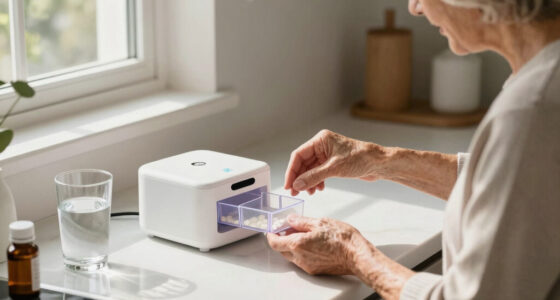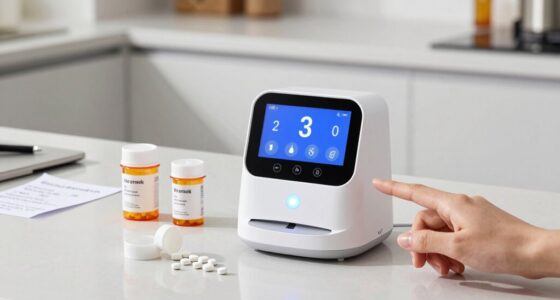
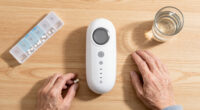
This guide helps caregivers and seniors set up and operate an automatic pill dispenser. It covers choosing the right device, configuring medication schedules, and troubleshooting common issues to ensure safe and reliable medication management.
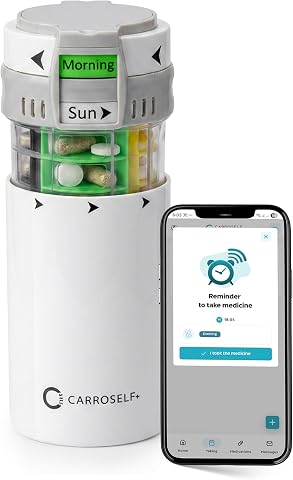
Pill Dispenser with App Reminder – 4 Daily Doses, Senior & Adult Use, No Batteries Needed
- ✔ Compartments: 28
- ✔ Pills per compartment: Up to 11
- ✔ Doses per day: 1-4

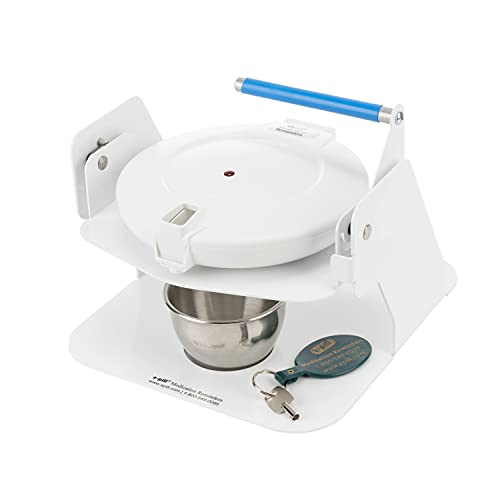
e-Pill MedTime Station Locked Automatic Medication Dispenser
- ✔ Compartment Count: 28
- ✔ Alarm Support: Up to 28 daily alarms
- ✔ Material: Stainless steel medicine cup

Windtrace Automatic Pill Dispenser for Elderly with Alarm, 28-Slot, Monthly Use, Kid-Proof, Built-In Lock, Easy Setup, XL LCD
- ✔ Slots: 28
- ✔ Use: Monthly
- ✔ Alarm: Yes, 6 times daily
Difficulty: Intermediate | Time: 30-45 minutes
What You’ll Need
Tools & Materials:
- Automatic pill dispenser suitable for seniors
- Medications to be dispensed
- Access to Wi-Fi or Bluetooth (if required by device)
- Smartphone or tablet (optional, for app-based models)
Knowledge:
- Basic understanding of medication schedules
- Ability to follow device instructions
Choose a dispenser with features that match the senior’s needs, such as audible alerts, large buttons, or remote monitoring capabilities. Read the device manual before starting.

Pill Dispenser with App Reminder – Easy-to-Use Pill Organizer for 4 Daily Doses, AM/PM Supplement and Vitamin Organizer for Senior & Adults, Easy-Slide Storage for Medication Use | No Batteries Needed
HOLISTIC MEDICATION MANAGEMENT – Upgrade to a smarter routine with Carroself! This patent-protected, battery-free system combines dedicated storage...
As an affiliate, we earn on qualifying purchases.
Pill Dispenser with App Reminder – 4 Daily Doses, Senior & Adult Use, No Batteries Needed
This smart, battery-free pill organizer stands out for its eco-friendly design and customizable labels, making medication management discreet and flexible. Its support for a dedicated reminder app allows users to receive alerts on their smartphones, ideal for tech-savvy seniors or caregivers managing multiple patients. Compared with electronic-only options, it’s more sustainable, but its reliance on a smartphone can be a drawback for users without compatible devices or those seeking a purely standalone device. The limited 28 compartments may also be a constraint for those with complex routines.
Pros:
- Battery-free and eco-friendly operation
- Customizable labels for easy identification
- Supports medication reminders via app
Cons:
- Requires smartphone for app notifications
- Limited to 28 compartments, not suitable for complex routines
- No built-in electronic alerts for users without smartphones
Best for: Seniors comfortable with smartphones or caregivers managing multiple users who value sustainability
Not ideal for: Seniors without smartphones or those preferring purely battery-free, standalone devices
Bottom line: Ideal for tech-savvy seniors who want an eco-friendly, customizable pill management solution paired with smartphone reminders.
“Ideal for tech-savvy seniors who want an eco-friendly, customizable pill management solution paired with smartphone reminders.”
e-Pill MedTime Station Locked Automatic Medication Dispenser – Helps Prevent Missed or Double Doses for Seniors, Alzheimer's & Dementia Patients, Caregivers & Independent Living
✅Help Prevent Missed or Double Doses – Designed for seniors, dementia and Alzheimer's patients, this locked automatic medication...
As an affiliate, we earn on qualifying purchases.
e-Pill MedTime Station Locked Automatic Medication Dispenser
The e-Pill MedTime Station offers robust security features with its locked compartments and scheduled alarms, making it well-suited for seniors who need help avoiding missed or double doses. Its antimicrobial silver ion technology adds a hygienic benefit, while the secure locking system helps prevent tampering. Compared with simpler models, it requires batteries, which need regular replacement, and its electronic interface can be complex for some users. However, its safety features make it a top choice for those with cognitive challenges or caregivers concerned about medication safety.
Pros:
- Helps prevent missed or double doses with up to 28 alarms
- Secure locking system prevents tampering
- Antimicrobial protection for hygiene
Cons:
- Requires batteries, with ongoing replacement needs
- Potentially complex setup for users unfamiliar with electronics
- Bulkier design may be less portable
Best for: Seniors who need scheduled alarms and secure medication storage, especially with caregiver oversight
Not ideal for: Users looking for a no-fuss, battery-free device or those uncomfortable with electronic locks
Bottom line: Best suited for seniors needing highly secure, alarm-based medication management, with some tradeoff in maintenance and complexity.
“Best suited for seniors needing highly secure, alarm-based medication management, with some tradeoff in maintenance and complexity.”

Windtrace Automatic Pill Dispenser for Elderly with Alarm
Smart Pill Dispenser Organizer: Our pill dispensers and organizers help you organize, monitor & dispense all kinds of...
As an affiliate, we earn on qualifying purchases.
Windtrace Automatic Pill Dispenser for Elderly with Alarm, 28-Slot, Monthly Use, Kid-Proof, Built-In Lock, Easy Setup, XL LCD
The Windtrace Automatic Pill Dispenser excels in user-friendliness with its large LCD display and straightforward setup. It supports up to 6 daily alarms, making it suitable for seniors with simple to moderate medication routines. Its built-in lock and kid-proof design bolster security, while the removable tray facilitates easy refills. However, it requires 4 AA batteries, which are not included, and its bulkiness may limit portability for travel. Some users may find the lid mechanism slightly stiff, but overall, it offers an accessible solution for those who prioritize clarity and ease of use.
Pros:
- Large, easy-to-read LCD display
- Simple setup with clear instructions
- Built-in lock and kid-proof design
Cons:
- Requires 4 AA batteries not included
- May be bulky for travel use
- Lid mechanism can be stiff for some users
Best for: Seniors seeking a simple, visually clear dispenser with minimal tech complexity
Not ideal for: Travelers or users needing a compact, lightweight device or those who prefer no batteries
Bottom line: Ideal for seniors who need a straightforward, visually accessible pill dispenser with basic alarm features.
“Ideal for seniors who need a straightforward, visually accessible pill dispenser with basic alarm features.”
As an Amazon Associate we earn from qualifying purchases.
Before You Start
Ensure the dispenser is placed in a safe, accessible location. Confirm the medications are correctly labeled and organized. Check that the device has fresh batteries or is plugged in. Review the user manual for specific setup instructions.
Step-by-Step Instructions
Step 1: Unbox and inspect the device
Remove the pill dispenser from its packaging and verify all parts are included, such as the main unit, medication trays, power source, and user manual. Check for any damage.
Tip: If any parts are missing or damaged, contact the seller or manufacturer before proceeding.
Check: All parts are present, undamaged, and ready for setup.
Step 2: Insert batteries or connect power
If the device runs on batteries, insert fresh batteries into the designated compartments following the polarity markings. If it requires an electrical outlet, plug it into a power source.
Tip: Use high-quality batteries to prevent power interruptions.
Check: Device powers on and displays initial startup screen or indicator lights.
Step 3: Load medications into the dispenser
Open the medication trays or compartments according to the manual. Place each medication in its designated slot, ensuring correct dosage and labeling. Close all compartments securely.
Tip: Use the device’s labeling or color coding features to avoid mix-ups.
Check: All medications are loaded correctly and compartments are securely closed.
Step 4: Configure the medication schedule
Follow the device’s setup guide to program medication times, doses, and alerts. Use the onboard controls or companion app as directed.
Tip: Double-check times and doses before confirming the schedule.
Check: Device displays the correct schedule and is set to dispense medications at the designated times.
Step 5: Test the dispenser
Run a test cycle or manually dispense a dose to verify proper operation. Observe the dispensing process and confirm medications are ejected correctly.
Tip: Use a small, non-medication item for testing if the device allows.
Check: Dispenser releases the medication properly, and alerts or indicators activate as expected.
Step 6: Educate the user
Explain how the dispenser works, including how to refill, reset, or troubleshoot. Demonstrate the process and answer any questions.
Tip: Provide written instructions or contact information for support.
Check: User understands how to operate and troubleshoot the device.
Common Mistakes to Avoid
- Loading incorrect medications or doses — Double-check labels and doses before loading each compartment. Use color coding or labels for clarity.
- Not programming the schedule accurately — Review each programmed time and dose carefully before confirming. Cross-reference with prescription instructions.
- Ignoring device alerts or warnings — Monitor alerts regularly and respond promptly to errors or low battery warnings.
- Placing the dispenser in an inaccessible or unsafe location — Choose a spot that is easy for the senior to access and safe from spills or falls.
Troubleshooting
Problem: Device not dispensing medication at scheduled times
Solution: Check the schedule programming, ensure the device is powered on, and verify the medication is loaded properly.
Problem: Dispenser jams or does not release medication
Solution: Open the dispenser, remove any jammed pills, clean the mechanism if necessary, and test again.
Problem: Device displays error messages or alerts
Solution: Consult the user manual to interpret the message. Reset the device or replace batteries if needed.
Problem: Medications are not visible or seem misplaced
Solution: Open the medication compartments to verify correct loading and secure closure.
What Success Looks Like
The dispenser operates on schedule, releases medications correctly, and the user is confident in its use. The device displays no error messages, and medications are dispensed at the right times without jams or malfunctions.
Next Steps
Regularly monitor the dispenser to confirm proper operation. Refill medications as needed, update schedules if prescriptions change, and clean the device according to the manual. Seek technical support if issues persist.
Frequently Asked Questions
How often should I clean the pill dispenser?
Clean the device at least once a month or as recommended by the manufacturer using a damp cloth and mild detergent. Avoid immersing electronic parts in water.
Can the dispenser handle multiple medications at the same time?
Yes, many models support multiple compartments for different medications, set for different times. Verify the device features before purchase.
What if the device runs out of power during the day?
Ensure batteries are fresh or the power cord is plugged in. Some devices have backup batteries or alerts for low power.
How do I update the medication schedule if prescriptions change?
Use the device’s controls or app to reprogram the schedule. Confirm changes before saving.