
When families start worrying about a parent falling at home alone, the first product category they encounter is the medical alert system — the classic pendant or wristband that connects to a monitoring center at the press of a button. The second option they usually discover is the smartwatch: an Apple Watch or Samsung Galaxy Watch that can detect falls automatically, call emergency services, track heart rhythms, and do everything else a smartwatch does. Both promise safety. They deliver it in very different ways.

Turn quiet afternoons into listening time
- Thousands of audiobooks, podcasts and originals
- Listen on your phone, tablet or Echo — also offline
- Cancel anytime
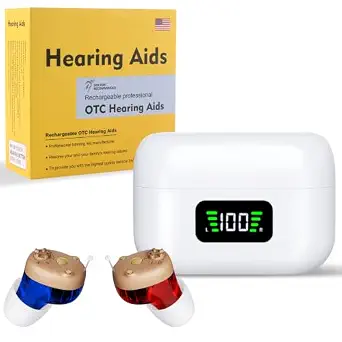
Rechargeable Hearing Aids for Adults – Discreet In-Ear Assistive Devices with Charging Case
- ✔ Design: In-ear, discreet
- ✔ Power: Rechargeable batteries with charging case
- ✔ Volume Control: Physical volume dial

Coocure Couch Stand Assist Rail for Seniors – Sit to Stand Aid Bar for Sofa, Chair, and Recliner
- ✔ Brand: Coocure
- ✔ Model Number: COOCURE
- ✔ Item Weight: 30 lbs

Bed Rails for Elderly Adults – Adjustable Steel Bed Assist Rail with Storage Bag
- ✔ Brand: Yetulike
- ✔ Model Number: HC030
- ✔ Color: Grey
The real decision tension is this: a dedicated medical alert system is a single-purpose device optimized for reliability, long battery life, and simplicity, usually with a monthly monitoring fee. A smartwatch bundles emergency features into a device that also needs nightly charging, a paired smartphone or cellular plan, and a user willing to wear and interact with it. One is an insurance policy; the other is a lifestyle device with an insurance feature.
This comparison walks through both options across the criteria that actually drive the decision — emergency response reliability, ease of use, battery life, health monitoring, cost over time, fall detection quality, and independence benefits — so you can match the right device to the right senior and the right family situation.
At a Glance
| Criteria | Dedicated Medical Alert Systems | Smartwatches (Apple Watch, Samsung Galaxy Watch) | Winner |
|---|---|---|---|
| Emergency response reliability | 24/7 professional monitoring center, trained operators, cellular backup, GPS options | Calls emergency services or contacts directly; depends on charge, cellular/Wi-Fi, and correct settings | A |
| Ease of daily use | Press one button; no menus, minimal learning curve | Requires daily charging, occasional app interaction, comfort with a touchscreen | A |
| Battery life | Pendants: months to a year; wrist buttons: 1–2 days; in-home base units: always powered | 18–36 hours; requires disciplined nightly charging | A |
| Automatic fall detection | Available on premium pendants, generally reliable, fewer false positives reported | Good but prone to false positives; auto-calls SOS after a countdown unless dismissed | Depends |
| Health monitoring | Minimal; some offer step counting, that’s about it | Extensive: ECG, irregular rhythm alerts, SpO2, sleep, activity, medication reminder apps | B |
| Ongoing cost | $25–50/month typical; equipment often included or leased | $0 monitoring fee, but cellular model costs more upfront plus optional cellular plan | Depends |
| Setup and tech requirements | Almost none; arrives pre-configured, activation call required | iPhone (Apple Watch) or Android phone, app setup, account management by user or family | A |
| Everyday appeal | Often resisted due to stigma of ‘old person’ device | High; users want to wear it, feels like a normal watch | B |
Rechargeable Hearing Aids for Adults – Discreet In-Ear Assistive Devices with Charging Case
Unlike the two rails in this lineup, which address mobility, this option tackles what is often the more isolating challenge: hearing loss. These in-ear amplifiers stand out for their discreet, low-profile design that most seniors will find far more acceptable than bulkier behind-the-ear devices, and that acceptance matters — a hearing aid that goes unworn helps no one.The real differentiator here is power management. The charging case with digital battery display eliminates the fiddly battery swaps that frustrate many seniors with traditional hearing aids, and the automatic on/off function means there is no tiny switch to hunt for — removing the devices from the case turns them on, and docking them turns them off. Compared with the Coocure rail, which requires zero daily interaction, this device does demand a small routine: first-time users need to adjust volume gradually to avoid discomfort, and the earplugs must be completely dry after rinsing before going back on the device.Fit flexibility is solid, with multiple earplug sizes and interchangeable left/right ear use, though buyers should note the absence of any waterproofing — a genuine limitation for anyone hoping to wear them in rain or humid conditions. Still, as a low-maintenance entry point into hearing amplification, this pick makes the most sense for seniors who want set-and-forget simplicity rather than clinical-grade tuning.
Pros:
- Rechargeable design with charging case eliminates battery replacements entirely
- Digital display shows battery status for both the case and the devices
- Automatic on/off when removed from or docked in the case removes fiddly controls
- Multiple earplug sizes and interchangeable ear use for a customized fit
Cons:
- Not waterproof, ruling out use in rain or humid environments
- Requires gradual volume adjustment for first-time users
- Earplugs must be fully dried after rinsing before reattachment
Best for: Seniors with mild to moderate hearing difficulty who want a discreet, low-maintenance amplification solution without battery replacements.
Not ideal for: Anyone needing waterproof devices, or seniors with significant hearing loss who require professionally fitted hearing aids.
Bottom line: A strong pick for seniors seeking discreet, rechargeable hearing support with the simplest possible daily operation.
“A strong pick for seniors seeking discreet, rechargeable hearing support with the simplest possible daily operation.”
Coocure Couch Stand Assist Rail for Seniors – Sit to Stand Aid Bar for Sofa, Chair, and Recliner
Of the two mobility rails in this comparison, the Coocure is the heavyweight — literally. At 30 lbs on its own, it is roughly triple the effort to move than a typical bed rail, but that mass is exactly why it earns our top spot for chair transfers: the base stays planted without any anchoring to the furniture, so there is no risk of it tipping when a user pushes hard against it during a sit-to-stand motion.The 500 lb weight capacity, reinforced with a six-screw connection, is the highest in this lineup and gives caregivers real confidence for bariatric users or anyone who leans heavily on the bar. Five adjustable support bars let you match the handle height to the user, and the 32mm grip bar is a comfortable diameter for arthritic hands — a detail that matters more than it sounds. Compared with the Yetulike bed rail, which anchors to a bed frame with a strap, the Coocure takes a different approach to stability: weight instead of attachment.That philosophy creates its tradeoff. The same heft that keeps it stable makes repositioning between rooms a genuine chore, and the under-furniture design may not fit all couch designs — particularly sofas with enclosed bases or very low clearance. Measure before buying. For seniors who struggle most with rising from a soft, low couch, though, this model is better suited than anything else here.
Pros:
- Heavy 30 lb base keeps the rail stable without any additional anchoring
- Supports up to 500 lbs with a six-screw reinforced connection
- Includes five removable, waterproof non-slip grip covers
- Five adjustable support bars accommodate different user heights
Cons:
- Heavy unit is difficult to reposition between rooms or furniture
- Requires sliding under furniture, which may not fit all couch designs
Best for: Seniors with limited mobility who struggle to stand from soft couches or recliners, especially heavier users who need a rock-solid support bar.
Not ideal for: Households that need to move the rail frequently, or sofas with enclosed bases and insufficient under-furniture clearance.
Bottom line: The most stable and highest-capacity option in this roundup — ideal for couch transfers if your furniture can accommodate it.
“The most stable and highest-capacity option in this roundup — ideal for couch transfers if your furniture can accommodate it.”
Bed Rails for Elderly Adults – Adjustable Steel Bed Assist Rail with Storage Bag
Where the Coocure relies on sheer weight for stability, the Yetulike bed rail takes the opposite approach: a lighter frame secured with an anchor strap and adjustable height legs that brace against the floor and bed frame together. The result is a rail that is far easier to handle during setup and repositioning — the tradeoff is a lower 350 lb weight capacity, which covers most users but falls well short of the Coocure’s 500 lb rating for bariatric needs.Setup is where this option stands out most. Tool-free assembly means it goes from box to bedside in minutes without hunting for a screwdriver — a genuine advantage over the Coocure, whose multi-screw reinforcement demands more assembly effort. The extendable non-slip handle adjusts from 22.4 to 29.9 inches, and height-adjustable legs fit floor-to-frame heights from 14.1 to 19.6 inches, covering everything from a twin to a king. A detachable storage bag keeps glasses, remotes, or medication within reach, a small feature that meaningfully reduces nighttime falls from reaching.The compatibility requirement is the main caveat: beds with frames under 14.1 inches — particularly very low platform beds — will not work. But for standard bed heights, this rail delivers the best balance of adjustability, ease of setup, and everyday practicality in this lineup.
Pros:
- Supports up to 350 lbs for users of many sizes
- Adjustable handle and height fit most bed sizes from twin to king
- Tool-free assembly with anchor strap for added stability
- Detachable storage bag keeps essentials within safe reach
Cons:
- Requires a bed frame height of at least 14.1 inches
- May not fit very low platform beds
- Lower weight capacity than comparable stand-assist rails
Best for: Seniors, post-surgery patients, or pregnant users who need safe bed entry and exit on a standard-height bed without complicated installation.
Not ideal for: Users over 350 lbs, or households with low platform beds under 14.1 inches of frame height.
Bottom line: The easiest rail to set up in this roundup and a smart value pick for standard beds, provided your frame height clears 14.1 inches.
“The easiest rail to set up in this roundup and a smart value pick for standard beds, provided your frame height clears 14.1 inches.”
As an Amazon Associate we earn from qualifying purchases.
Key Differences
The most consequential difference is how each device reaches help. A medical alert system connects to a live monitoring center staffed around the clock. When the button is pressed, a trained operator answers, assesses the situation, and dispatches emergency services or a designated family member. This chain has almost no failure points the user can introduce — no settings to misconfigure, no phone to pair, no battery to forget. A smartwatch, by contrast, calls emergency services or emergency contacts directly. That cuts out a subscription, but it means the watch must be charged, worn, unlocked-or-configured correctly, and connected to cellular or a nearby phone. Every one of those is a step where a frightened or confused user can fail.
The second major difference is willingness to wear the thing. This is where smartwatches win decisively for a large group of seniors. Many older adults refuse pendants because of the stigma — the device announces frailty. An Apple Watch is something a grandchild also wears; it carries no such message. A safety device left in a drawer provides zero safety, so appeal is not a superficial criterion. On the other hand, a smartwatch that sits on its charger half the day because charging was forgotten is equally useless, and battery discipline is a genuine weak point for users with memory decline.
Finally, there is the cost structure. Medical alert systems look cheap upfront but carry a perpetual monthly fee — $25 to $50 that continues for years. A cellular Apple Watch costs several hundred dollars upfront but nothing per month beyond an optional cellular line. Over four or five years, the totals converge, so cost alone rarely decides this; reliability and wearability should.
Detailed Comparison
Emergency response reliability (Dedicated Medical Alert Systems wins — major)
This is the category medical alert systems were invented for, and it shows. A dedicated system routes every press of the button to a human operator who can talk through the device’s speaker, assess the emergency, and dispatch the right responders. Most modern systems include cellular backup in the base unit, so a landline outage doesn’t silence it. Smartwatches handle emergencies competently when everything is configured, but the response path depends on the watch being charged, worn, and connected. If the watch has lapsed into a low-power state, lost cellular signal in a basement, or the user dismisses the fall-detection countdown because they’re disoriented, help never comes. For a user whose primary risk is a fall while alone, the dedicated system is measurably more dependable.
Ease of daily use (Dedicated Medical Alert Systems wins — moderate)
Medical alert pendants are close to foolproof: one button, no screens, no menus, nothing to learn. Smartwatches demand more from the user — nightly charging, occasional touchscreen taps, remembering to put it on after a shower, tolerating notifications. For a cognitively sharp senior who already uses a smartphone, this is trivial. For someone with early dementia, arthritis that makes small touch targets hard, or simple tech aversion, the smartwatch’s complexity becomes a real barrier. The pendant wins for the frailest users; the gap narrows to near zero for tech-comfortable seniors.
Battery life and charging (Dedicated Medical Alert Systems wins — major)
Medical alert pendants run for months to a full year on a sealed battery, and in-home base units are always plugged in. Smartwatches need charging every one to two days. This sounds like a minor annoyance, but it is the single most common failure mode for smartwatch-based safety: the watch is on the charger when the fall happens. Some mitigation exists — charging stands placed by the bed, family reminders — but the structural disadvantage doesn’t go away. If the user cannot reliably maintain a charging routine, this criterion alone can disqualify the smartwatch.
Automatic fall detection (moderate difference)
Both categories offer it, with different characters. Apple’s fall detection is well regarded and triggers an automatic emergency call if the user doesn’t dismiss a countdown within about a minute — a smart design for unconscious users. However, it produces false positives from activities like vigorous exercise or bumping into furniture, which can annoy users into disabling it. Premium medical alert pendants also offer fall detection as an add-on (often $5–10 more per month), and operators verify before dispatching, reducing false-alarm fatigue. It’s roughly a tie on detection capability; the dedicated system has an edge in how alarms are handled, while the smartwatch’s countdown-then-call design is genuinely good for unresponsive users.
Health monitoring and prevention (Smartwatches (Apple Watch, Samsung Galaxy Watch) wins — major)
This is where the smartwatch runs away with it. An Apple Watch can record ECGs, flag irregular heart rhythms suggestive of atrial fibrillation, measure blood oxygen, track sleep, count steps, and host medication reminder apps. Several of these features have genuinely caught serious conditions early in older adults. Medical alert systems offer almost none of this — at best a step counter on premium models. If the goal extends beyond ‘call for help after a fall’ to ‘catch problems before they cause a fall,’ the smartwatch is categorically better.
Ongoing cost (moderate difference)
Medical alert systems typically cost $25–50 per month, indefinitely, with equipment usually included. A cellular smartwatch costs roughly $250–800 upfront plus an optional $10/month line. Over three to four years, totals are comparable; over one year, the medical alert system is far cheaper to try. Neither is a clear value winner in the abstract — it depends on how long the device is used and whether the smartwatch’s other features carry value for the user. The honest framing: the medical alert system rents reliability; the smartwatch buys capability.
Setup and family management (Dedicated Medical Alert Systems wins — moderate)
Medical alert systems arrive pre-configured; activation is a phone call, and the monitoring center keeps emergency contacts and medical info on file. Smartwatches require an iPhone (for Apple Watch) or compatible Android phone, account setup, app configuration, and periodic maintenance like software updates. Family members can manage much of this remotely via shared apps, which is genuinely useful for long-distance caregivers — but someone has to own that task. For families with no tech-savvy member nearby, the dedicated system is dramatically simpler.
Wearability and everyday appeal (Smartwatches (Apple Watch, Samsung Galaxy Watch) wins — major)
The best device is the one that’s actually worn. Many seniors reject medical alert pendants on sight — they signal ‘I’ve become fragile’ — and a rejected device protects no one. Smartwatches carry social cachet, look like ordinary watches, and users often enjoy wearing them, which translates directly into better safety coverage. This criterion regularly overrides the smartwatch’s technical weaknesses: an imperfect device on the wrist beats a perfect device in the drawer.
Dedicated Medical Alert Systems: Pros and Cons
Pros:
- Purpose-built emergency response with 24/7 live operators
- Months-long or year-long pendant battery life; nothing to charge daily
- Nearly zero learning curve — one button
- Works without a smartphone, app, or tech skills
- Waterproof pendants work in the shower, where many falls happen
Cons:
- Perpetual monthly fee of $25–50
- Stigma; many seniors refuse to wear the pendant
- No meaningful health monitoring or prevention features
- No everyday utility — it does one thing
Smartwatches (Apple Watch, Samsung Galaxy Watch): Pros and Cons
Pros:
- Strong fall detection with automatic SOS countdown
- Rich health monitoring: ECG, irregular rhythm alerts, sleep, activity
- High wearability — users want it on their wrist
- No monthly monitoring fee; GPS location sharing for caregivers
- Multipurpose: calls, messages, reminders, and safety in one device
Cons:
- 18–36 hour battery requires disciplined daily charging
- Requires a paired smartphone, setup, and ongoing tech management
- Emergency calling depends on charge and connectivity — more failure points
- Higher upfront cost, especially for cellular models
Who Should Choose What
Choose Dedicated Medical Alert Systems if:
- The senior lives alone with a high fall risk and cannot be counted on to charge a device nightly
- There is any cognitive decline — simplicity is the priority, and misconfiguration is a real danger
- The user will actually wear the pendant, or a wrist-style medical alert button is acceptable
- The family wants a guaranteed human response chain rather than automated calls
- No family member can handle smartphone-app setup and maintenance
Choose Smartwatches (Apple Watch, Samsung Galaxy Watch) if:
- The senior refuses a ‘medical’ device but would happily wear an attractive watch
- They already use and enjoy a smartphone (especially an iPhone for Apple Watch)
- Health monitoring and early warning — heart rhythm, activity, sleep — matter as much as fall response
- Daily charging is realistic, or a family member can build the routine
- Budget prefers an upfront purchase over a permanent monthly subscription
Skip both if: The senior is at high risk but refuses to wear any device — in that case address the refusal first (wrist-style options, involving them in the choice), or consider in-home sensor-based monitoring that requires nothing to be worn.
Value for Money
Value depends on the timeframe and what you’re buying. The medical alert system’s monthly fee buys a managed service: monitored response, stored medical information, and equipment support. Over five years at $30/month, that’s about $1,800 — substantial, but it funds the most reliable emergency chain available. The smartwatch’s $300–800 upfront cost is easier to justify when the user gains health tracking, communication, and a device they enjoy daily; the safety features are effectively free riders on a purchase that has standalone value.
The strongest value play, for families whose budget allows, is pairing a lower-cost medical alert plan with a smartwatch — the watch for prevention and wearability, the pendant for guaranteed response. But if only one budget line exists, spend it on reliability for frail or cognitively impaired users, and on the smartwatch for healthy, tech-comfortable ones. Paying for a premium smartwatch purely as a safety device is poor value; paying for it as a health and lifestyle device with safety included is good value.
Final Verdict
For the classic scenario — an aging parent living alone, elevated fall risk, family worried about the hours when nobody’s there — the dedicated medical alert system is the better choice, and we say that without hedging. Its advantages land exactly where the stakes are highest: guaranteed response, no charging routine to break, no settings to fail. The smartwatch’s battery and configuration dependencies are tolerable annoyances for a 40-year-old and genuine liabilities for an 85-year-old with mild cognitive impairment.
Choose the smartwatch when the deciding factor is whether the device gets worn at all, or when the senior is active, cognitively intact, and already in the Apple or Samsung ecosystem. A refused pendant protects nobody; a worn watch with good fall detection and heart monitoring protects them constantly. And if the budget allows, the ideal setup for many families is both: the watch for daily health and engagement, the pendant as the failsafe that never needs to be charged or understood.
The single biggest deciding factor is the user themselves: their cognitive state, their charging reliability, and their willingness to wear the device. Match the device to the person, not to the spec sheet.
Frequently Asked Questions
Can a smartwatch fully replace a medical alert system?
For a tech-comfortable senior who charges it reliably and keeps it connected, it comes close — automatic fall detection with SOS calling covers the core emergency scenario. But it can’t match a monitored response center’s reliability, and its dependency on battery and connectivity makes it a substitute rather than an equivalent. For high-risk users, treat the smartwatch as a supplement, not a replacement.
Do medical alert systems work outside the home?
Only GPS-enabled mobile models do. Traditional in-home systems rely on a base unit with a range of roughly 300–600 feet. If the senior gardens, walks the neighborhood, or drives, you need a mobile/GPS system, which typically costs $10–15 more per month than the in-home version.
Is fall detection automatic on these devices?
On Apple Watch it must be enabled for users under 65 and is on by default for 65+. On medical alert systems, fall detection is usually an add-on costing $5–10 per month. In both cases, verify it’s active — an enormous number of devices ship with it off.
What happens if a fall is detected but the user is unconscious?
The Apple Watch displays a countdown; if it isn’t dismissed, it calls emergency services and messages emergency contacts with location. Medical alert systems with fall detection connect to an operator; getting no response, they dispatch help. Both handle the unconscious-user case well — the difference is what happens before and after that moment: battery state, connectivity, and who receives the alert.
My parent refuses to wear any device. What now?
A rejected device provides zero protection, so solve the refusal first. Try a watch-style medical alert that looks like an ordinary watch, or a smartwatch pitched as a gift rather than a safety measure. Involving the senior in choosing the device dramatically improves acceptance. If all wearables are refused, in-home sensor systems that detect falls without any worn device exist as a last resort.
Fall Picks
fall essentials
As an affiliate, we earn on qualifying purchases.