To set up senior-friendly phones for safety, program essential emergency contacts into speed dial or dedicated buttons for quick access. Choose devices with large, clearly labeled buttons and simple menus to reduce errors, and consider phones with voice amplification and visual alerts. Keep the setup straightforward, teach how to use the features, and place the phone within easy reach. If you want to learn more about customizing these systems for maximum security, keep exploring these options.
Key Takeaways
- Program essential emergency contacts into speed dial or dedicated buttons for quick, one-touch access.
- Choose phones with large buttons, clear labels, and simple interfaces to prevent dialing errors.
- Enable visual alerts like flashing lights and loud volume or amplification features for better hearing support.
- Incorporate safety features such as “help” buttons or wearable pendants for rapid assistance.
- Regularly teach and practice accessing emergency contacts to ensure confidence and quick response.
Ensuring that seniors can easily make and receive calls is essential for their safety and independence. When setting up a senior-friendly phone system, you want to prioritize simplicity and quick access. Start by programming emergency contacts directly into the phone’s speed dial or dedicated buttons. This way, in an emergency, your loved one can connect with help instantly, without fumbling through menus or remembering numbers. Make sure these emergency contacts include local emergency services, close family members, and trusted neighbors. Keep the list limited to a few necessary numbers so it’s easy to find and use, reducing any confusion during stressful moments.
Voice amplification is another critical feature to consider. Many seniors experience hearing loss, which can make phone conversations difficult. Phones equipped with voice amplification boost the sound, making it easier for your loved one to hear and be heard clearly. This reduces frustration and guarantees they stay connected in essential situations. When choosing a phone, look for models that offer adjustable volume controls and built-in amplification options. Some phones even have visual indicators, like flashing lights, to alert users when they receive a call, further supporting those with hearing impairments.
In addition to hardware features, make sure the phone’s interface is straightforward. Large, clearly labeled buttons help prevent dialing mistakes, and minimal menus mean less confusion. If the device has a touchscreen, ensure it’s responsive and easy to navigate. Teach your loved one how to access their emergency contacts quickly and practice the process together so they’re comfortable doing it on their own. Labeling buttons or providing a simple guide can also be helpful. Additionally, natural pools designed with accessibility in mind can include features like non-slip surfaces and easy entry points to support safe and comfortable use.
Consider adding a cordless phone with a long-range base station, which allows your senior to move around their home comfortably while staying connected. Wireless models often come with handsets that are easy to hold and operate, reducing strain and making calls less cumbersome. For added safety, some systems include features like a dedicated “help” button or a wearable pendant that can dial a pre-set number at the push of a button, guaranteeing help is just a moment away.
Ultimately, the goal is to create a setup that minimizes barriers to communication. By programming emergency contacts, incorporating voice amplification, and choosing accessible devices, you empower your loved one to reach out confidently and quickly whenever needed. This simple yet thoughtful approach guarantees they stay safe, connected, and independent in their daily lives.
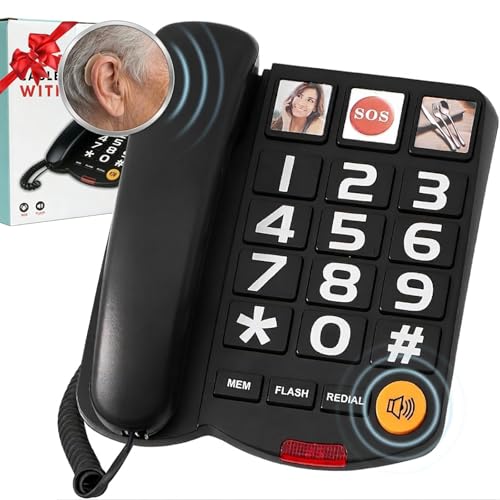
Extra-Loud (110dB) Landline Phone for Seniors & Hearing Impaired – Hearing Aid Compatible, Large Button Corded Phone with 3 Photo Speed Dial, Speakerphone – Black, Ideal Mother's
Easy Use, Clear Communication: This large button corded land line phones for elderly people is specifically designed to…
As an affiliate, we earn on qualifying purchases.
As an affiliate, we earn on qualifying purchases.
Frequently Asked Questions
Can Senior-Friendly Phones Be Used With Hearing Aids?
Yes, senior-friendly phones can be used with hearing aids. Look for models with hearing aid compatibility (HAC) to guarantee they work well together. Many phones also have sound amplification features that help you hear conversations more clearly. When choosing a phone, check the HAC rating and sound features to find one that provides the best support for your hearing aids and makes communication easier and safer for you.
Are There Emergency Call Systems Suitable for Outdoor Use?
Yes, there are emergency call systems designed for outdoor use with weatherproof features. You can install these systems outdoors, making certain they withstand rain, snow, and other elements. Look for models labeled as weatherproof or waterproof, and choose those specifically intended for outdoor installation. This way, you guarantee safety and quick access to help, no matter the weather or location, giving you peace of mind wherever you are.
How Do I Update or Change Speed Dial Numbers?
Think of your phone as a garden needing regular care. To update or change speed dial numbers, follow the programming instructions in your device’s manual or menu. If you face troubles, troubleshooting tips like restarting your phone or resetting the speed dial list can help. Just like tending to plants, maintaining your speed dial numbers keeps your communication blooming smoothly, ensuring safety and quick access whenever you need it.
What Is the Battery Life Expectancy for Senior Phones?
Your senior phone’s battery longevity typically ranges from 2 to 5 days, depending on usage and model. Good power management, like reducing screen brightness and turning off unnecessary features, can extend this. Keep the battery charged between 20% and 80% for best results. Regularly updating software may also improve battery performance, ensuring your phone stays reliable when you need it most.
Do These Systems Work With Landline and Mobile Networks?
These systems generally work with landline and mobile networks, but compatibility concerns can arise depending on your provider and device. Before installing, check the specifications and verify your phone system is compatible. Follow installation tips like connecting the device properly and testing calls to confirm functionality. If you’re unsure, consult the user manual or a tech expert to avoid setup issues and ensure reliable emergency communication.
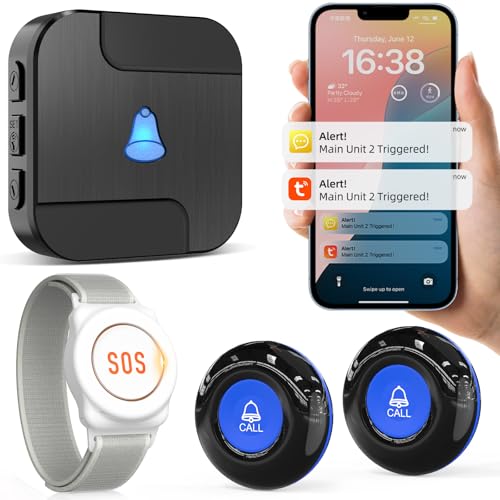
CallToU Wi-Fi Wireless Caregiver Pager Call Button for Elderly at Home, APP Emergency Alert Fall Help System for Seniors, Patients/Disabled Monitoring at Home
Wireless APP Caregiver Pager: The WIFI wireless caregiver pager use 433MHz technology for a 328ft /100m range, penetrating…
As an affiliate, we earn on qualifying purchases.
As an affiliate, we earn on qualifying purchases.
Conclusion
By setting up senior-friendly phones, you create a safer environment where help is just a quick dial away. Did you know that over 60% of emergency calls from seniors are made through simple, one-touch systems? This highlights how vital easy-to-use phones are for safety and peace of mind. Take a few moments to customize your loved ones’ devices—it’s a small step that can make a big difference in emergencies.

Hamilton CapTel 2400iSPNBT Captioned Telephone, Hearing Impaired Phones, Volume Control with up to 40dB Amplification Gain, Large Touch Screen Display, Wi-Fi Capable, Answering Machine & Speakerphone
Unmatched Accessibility and Convenience: Hamilton CapTel empowers people with hearing loss by transforming everyday calls into clear conversations….
As an affiliate, we earn on qualifying purchases.
As an affiliate, we earn on qualifying purchases.

SYNLETT Caregiver Pager Wireless Call Buttons for Elderly Monitoring SOS Alert System Portable Alarm for Nurse Call Seniors Patients Emergency Home
PORTABLE CAREGIVER PAGER: This wireless pager system comes with 2 wireless call buttons and 1 portable pager. It…
As an affiliate, we earn on qualifying purchases.
As an affiliate, we earn on qualifying purchases.